
Use Case: Hybrid Work
Employee Monitoring for Hybrid-First Companies: Equal Visibility for Office and Remote Staff
Employee monitoring for hybrid-first companies is a workforce visibility strategy that produces identical activity data for remote and in-office employees, giving managers one objective dataset to replace proximity-biased perception. eMonitor runs the same agent on home networks and office networks, no VPN required, so hybrid work becomes one measurable operation instead of two unequal ones.
7-day free trial. No credit card required.

What Is Employee Monitoring for Hybrid-First Companies?
Employee monitoring for hybrid-first companies is a workforce visibility practice where the same tracking tools, the same data policies, and the same performance standards apply to employees regardless of whether they work from a corporate office, a home office, or any combination of the two. The result is a unified activity dataset that managers consult when evaluating productivity, discussing performance, or verifying schedule compliance.
The key distinction from standard employee monitoring is intentionality about parity. Many organizations deploy monitoring for remote teams specifically because those employees are out of sight. Hybrid-first monitoring extends that same practice to in-office employees under the same policy, preventing a two-tier data situation where some workers are measured objectively and others are judged by visibility and face time.
Does consistent, cross-location monitoring actually produce better performance outcomes? Research on hybrid work fairness suggests it does. A 2023 McKinsey study found that hybrid employees who perceived equal treatment to their in-office counterparts showed 28% higher engagement scores and significantly lower voluntary turnover intentions. Measurement consistency drives that perception of equal treatment.
Why Does Proximity Bias Distort Hybrid Performance Data?
Proximity bias is the documented cognitive tendency for managers to evaluate employees who are physically nearby more favorably than those who are not, independent of actual output or performance quality. In hybrid organizations, proximity bias systematically advantages employees who choose or are required to spend more time in the office.
The research on this is not subtle. Stanford economist Nicholas Bloom's longitudinal study of call center workers found that remote employees were 13% more productive than their in-office counterparts, yet received 50% fewer promotions over the same period. The gap between output and career advancement was explained almost entirely by reduced manager visibility. Remote workers produced more and advanced less.
This creates a compounding problem in hybrid organizations. Employees who observe the career advancement gap shift their behavior: they come into the office not to collaborate but to be seen. This defeats the flexibility purpose of hybrid work and increases office overhead without productivity gains. Microsoft's 2023 Work Trend Index reported that 73% of employees said they would not feel comfortable being the only remote person in a hybrid meeting, and 43% felt that remote workers are less likely to be considered for promotions.
Monitoring addresses proximity bias by providing managers with documented, quantified activity data for every employee. When a performance discussion references app usage time, active hours, project contributions, and output metrics, the employee's physical location during those hours becomes irrelevant to the evaluation. The manager is no longer relying on presence-based impressions — they are reading data.
How Does eMonitor Work Across Office and Home Networks?
eMonitor's desktop agent operates at the application layer, not the network layer. This is a critical technical distinction for hybrid deployments because it means the agent does not depend on VPN connectivity, corporate DNS, or office network presence to function. The agent installs on the employee's device — company-issued or BYOD depending on policy — and communicates directly with the eMonitor cloud over any available internet connection.
No VPN Requirement
Organizations that require VPN for remote monitoring tools face a consistent problem: employees with poor home internet connections experience performance degradation, VPN connectivity failures produce gaps in monitoring data, and IT teams spend significant time supporting VPN issues that have nothing to do with the monitoring product itself. eMonitor avoids all of these failure modes. Data from a home network in Manchester and data from an office network in New York both reach the same central dashboard through the same standard HTTPS connection.
Hotel Desking: Activity Follows the User, Not the Seat
Hotel desking — the practice of employees using whichever available desk or workstation they find when arriving at the office — creates data continuity problems for monitoring tools that associate activity with a specific machine rather than a user account. eMonitor resolves this by tracking at the user session level. When an employee logs into any device using their credentials, monitoring operates under their profile. All activity that day appears in their individual record, not in a generic "shared workstation" category.
This matters for hybrid companies specifically because hotel desking is almost universal in hybrid-first office designs. Organizations that reduce their real estate footprint to match the percentage of employees expected in-office on any given day typically have more employees than dedicated desks by design. Without user-level tracking, hoteling environments produce fragmented or anonymous monitoring data.
Data Consolidation in a Single Dashboard
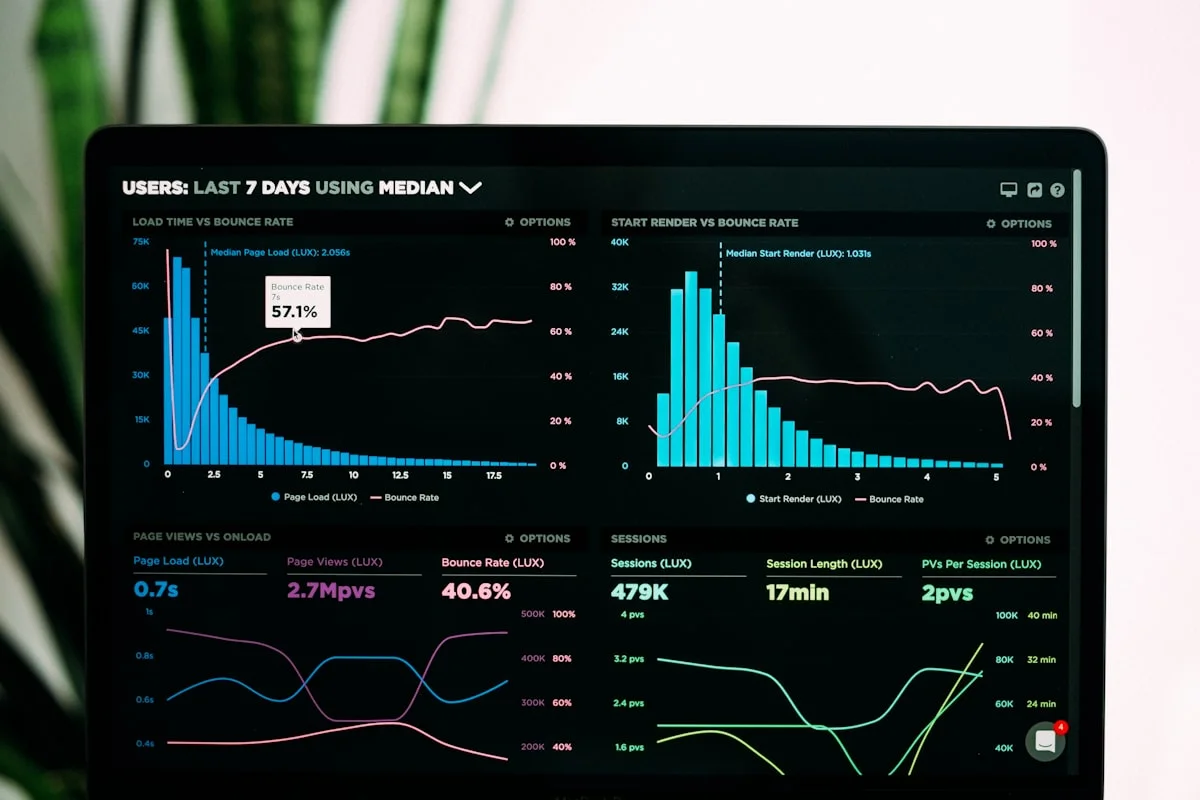
Every activity record in eMonitor — whether generated at a home office in Sydney or a corporate desk in Singapore — flows into the same reporting interface. Managers see their team's unified view without needing to toggle between remote and in-office data sources, create separate reports, or mentally reconcile different data formats. The real-time activity dashboard shows each employee's current status (active, idle, offline), their productive and non-productive time distribution, and their total hours for the day, all in one consolidated view regardless of where each team member is physically working.
Why Must Hybrid Monitoring Policy Apply Equally to Both Locations?
Policy parity is the most frequently overlooked dimension of hybrid monitoring programs. Many organizations monitor remote employees comprehensively while applying no formal monitoring to in-office employees, creating exactly the two-tier measurement problem they set out to solve. When remote workers know they are tracked and in-office workers are not, remote workers correctly perceive an unequal standard that disadvantages them regardless of their actual performance.
Writing a Location-Neutral Monitoring Policy
A location-neutral monitoring policy uses language that binds to the work session, not the location. The governing sentence should read something like: "eMonitor records application usage, active time, and periodic screenshots during any active work session, regardless of whether that session occurs at a company office, an employee's home, or any other work location." This framing makes the policy independent of geography from day one.
The policy must also specify the work-hours boundary explicitly. eMonitor records activity only during sessions the employee initiates by clocking in. Monitoring stops when the employee clocks out. This boundary is particularly important for home office workers in EU jurisdictions, where the line between work time and personal time carries specific legal significance under GDPR and national labor laws. Employees need documented assurance that monitoring does not extend into evenings and weekends simply because the monitoring device is in their home.
Communicating Policy to New Hires in Hybrid Environments
New hire orientation for hybrid companies should include the monitoring policy as a standard module, presented the same way to employees who will primarily work remotely and employees who will primarily work in-office. The orientation should demonstrate the employee-facing dashboard where staff can view their own monitoring data, confirm the work-hours-only boundary, and provide a written copy of the policy for the employee's records. This consistent onboarding experience prevents the common scenario where remote employees learn about monitoring from a policy document while their in-office colleagues remain unaware that monitoring applies to them as well.
How Does Monitoring Support Return-to-Office Policy Compliance?
Return-to-office mandates have created a new administrative burden for people operations teams at hybrid-first companies: verifying that employees are actually complying with required in-office days. Without a dedicated tracking system, this verification falls to managers doing manual headcounts, reviewing badge data from building access systems, or asking employees to self-report their location each day. All of these approaches are time-consuming, incomplete, or both.
eMonitor provides RTO compliance data as a byproduct of its standard activity monitoring. The platform captures work session records that managers and HR can cross-reference against required in-office schedules. Rather than building a separate attendance tracking process for RTO compliance, organizations use the monitoring data already flowing through the system.
What RTO Monitoring Data Shows
For each employee, the attendance and activity records show on which dates work sessions occurred and how many active hours were logged. When an organization requires, for example, three in-office days per week and maintains a separate badge access record, HR can reconcile these two data sources at any interval — weekly, monthly, or ahead of performance reviews. This process replaces the manager-level attendance tracking that most organizations currently rely on, which is inconsistent across teams and creates equity problems when some managers enforce the policy strictly and others do not.
It is worth stating clearly what monitoring does not do in this context: eMonitor does not automatically determine whether an employee is physically in the office versus working remotely. Location determination requires either badge system integration or GPS functionality. What eMonitor provides is a reliable, objective record of when work sessions occurred, which HR combines with other signals for full RTO compliance analysis.
Fairness Considerations in RTO Enforcement
Using monitoring data for RTO enforcement requires careful policy design. The organization must state in writing that monitoring records will be referenced for schedule compliance purposes. Applying this practice inconsistently — tracking some teams but not others, or applying stricter scrutiny to employees in certain roles — creates both legal exposure and trust damage. The monitoring-based RTO approach works best when it is universal, transparent, and applied through a consistent HR process rather than manager-by-manager discretion.
What Are the GDPR Requirements for Monitoring Home Office Workers in the EU?
GDPR places specific obligations on employers who monitor employees working from home, because the home is a private space protected under broader privacy rights in most EU member states. The legal framework permits home office monitoring when employers meet several conditions, but it is more demanding than in-office monitoring, where the work location itself has clearer professional-space status.
Lawful Basis
Most EU employers justify home office monitoring under Article 6(1)(f) of GDPR: legitimate interests. This requires a three-part test: the employer has a legitimate interest (productivity management, IP protection, compliance), the monitoring is necessary to achieve that interest (less intrusive alternatives are insufficient), and the employer's interest is not overridden by the employee's fundamental rights. A Data Protection Impact Assessment (DPIA) documenting this analysis is required when monitoring is likely to result in high risk to individuals, which workplace monitoring frequently qualifies as under Article 35.
Transparency Requirements
GDPR Article 5(1)(a) establishes transparency as a core data protection principle. For home office monitoring, this means employees must receive a privacy notice that specifies: what data is collected, the purpose of collection, the legal basis, how long data is retained, who has access, and employees' rights to access and erasure of their data. This notice must be provided before monitoring begins, not buried in a contract employees signed years before remote work became standard practice.
Proportionality and Minimization
The data minimization principle under GDPR Article 5(1)(c) requires that monitoring collects only data that is adequate, relevant, and limited to what is necessary. For home office workers, this has practical implications: screenshot frequency should be configured at intervals proportionate to the business need, keystroke logging requires particularly strong justification in home environments, and webcam-based monitoring is generally incompatible with proportionality requirements in most EU jurisdictions. eMonitor's configurable monitoring levels allow employers to apply less intrusive settings for home workers while maintaining productivity visibility.
Works Council Requirements for German Employers
German employers operating under the Betriebsverfassungsgesetz face the additional requirement of Betriebsrat co-determination before deploying any monitoring system. The Betriebsrat's consent under BetrVG Section 87(1)(6) is mandatory, not advisory. This applies to hybrid monitoring programs regardless of whether employees are in-office or remote on any given day. Employers planning a hybrid monitoring rollout in Germany should begin consultation at least three months before intended deployment. See the eMonitor works council consultation guide for the specific documentation required.
How Do You Implement Hybrid Monitoring Without Creating a Two-Tier System?
The implementation sequence matters enormously. Organizations that roll out monitoring for remote teams first and then add in-office employees later — or vice versa — almost always create at least a temporary two-tier situation, with the first group subject to scrutiny the second group has not yet experienced. A simultaneous rollout is the most equitable approach and the one that generates the least internal friction.
Step 1: Write the Policy Before Installing the Software
The monitoring policy document must precede any software installation. The policy defines what will be tracked, the work-hours boundary, who has access to data, and how data will be used. Writing the policy first forces the clarifying conversations about purpose and proportionality that organizations often avoid until after deployment, when changing the parameters is politically much harder.
Step 2: Inform All Employees Simultaneously
Send the monitoring policy and employee notice to all staff in the same communication. Hold a team meeting or all-hands to explain the program, answer questions, and confirm the employee-facing dashboard access. Simultaneous communication is the clearest signal that the policy applies equally to everyone. Informing remote workers privately first — or in-office workers privately first — creates the impression of a targeted rollout before the organization even begins.
Step 3: Deploy the Agent Across All Devices in One Window
IT deployment should target all managed devices in a single change window rather than in phases organized by employee location. Phase deployments organized by geography or work type create data gaps and reinforce the perception of unequal treatment during the rollout period.
Step 4: Share Dashboard Access With All Employees
Every employee, remote and in-office alike, receives access to their personal activity dashboard from day one. The transparent dashboard is not an optional add-on for trust-building — it is the primary mechanism through which employees verify for themselves that monitoring is operating exactly as described in the policy. Employees who can see their own data are far less likely to develop monitoring anxiety or distrust.
Step 5: Review Data Consistently Across Location Groups
Managers should schedule their monitoring data reviews on the same cadence for all team members. If a manager checks remote employees' activity weekly but never reviews in-office data, the monitoring program becomes functionally asymmetric even if the data collection is equal. Calendar scheduling for consistent data review prevents this drift.
What Business Outcomes Does Hybrid Monitoring Produce?
Hybrid-first monitoring programs that apply consistently across locations produce documented improvements across several dimensions. The outcomes below reflect research findings and patterns observed among organizations that have moved from perception-based hybrid management to data-driven approaches.
Reduced Bias in Performance Evaluations
When performance evaluations reference objective activity and output data, the influence of proximity bias decreases measurably. A 2024 study published in the Journal of Applied Psychology found that managers who used objective performance metrics in evaluations gave ratings that correlated 0.71 with actual output, compared to 0.43 for managers relying on observation alone. For hybrid teams, the gap is larger because observation is structurally limited for remote employees. Data-backed reviews narrow that gap.
Lower Voluntary Turnover Among Remote Employees
Remote employees at organizations with equitable hybrid monitoring programs show lower voluntary turnover than those at organizations where in-office presence drives career advancement. The causal mechanism is straightforward: employees who believe their contributions are measured and recognized fairly are less likely to leave. The cost differential matters — voluntary turnover typically costs 1.5 to 2 times an employee's annual salary when recruitment, onboarding, and lost productivity are included.
Cleaner RTO Policy Enforcement
Organizations with hybrid monitoring data spend significantly less HR time on RTO compliance verification. HR teams at organizations without automated attendance data report spending an average of 4 to 8 hours per week per 100 employees on manual RTO tracking. Monitoring-based automation reduces this to a report review that takes less than 30 minutes for the same population.
Accurate Workforce Capacity Data
Hybrid monitoring produces a real-time picture of workforce availability and productivity levels that manual management cannot match. When a project requires a rapid staffing decision, managers at hybrid-first companies with monitoring data can see current utilization rates, identify employees with available capacity, and make allocation decisions based on actual workload rather than estimated availability. This advantage compounds over time as historical data accumulates.
Frequently Asked Questions: Hybrid Employee Monitoring
What is employee monitoring for hybrid-first companies?
Employee monitoring for hybrid-first companies is a workforce visibility approach that captures activity data from both remote and in-office employees through the same platform and policy. It produces a unified dataset that managers use for performance discussions, removing the proximity bias that disadvantages remote workers when no objective data exists.
What is proximity bias and how does monitoring reduce it?
Proximity bias is the tendency for managers to rate in-office employees higher on performance because of greater physical visibility, not greater output. Stanford research found that remote workers receive 50% fewer promotions despite equal productivity. Monitoring eliminates proximity bias by replacing manager perception with documented activity and output data for both groups.
Does eMonitor require a VPN for remote employees?
eMonitor does not require a VPN for remote employees. The desktop agent operates independently of network configuration, transmitting data securely over any internet connection. Activity data from home networks, office networks, and mobile hotspots all flows to the same central dashboard without requiring IT intervention.
How does monitoring handle hotel desking in hybrid offices?
eMonitor tracks activity at the user account level, not the workstation level. Employees who use different desks on different days carry the same monitoring profile regardless of which machine they log into. All activity appears under the individual employee's profile, so hotel desking has no effect on data continuity or reporting accuracy.
Can monitoring verify RTO policy compliance without manual attendance tracking?
Yes. eMonitor records clock-in times, network context signals, and active work hours. Managers can see, per employee, on which days work sessions occurred and compare those records against the organization's required office schedule. This approach replaces manager-by-manager attendance verification with a single automated report.
Is monitoring home office workers legal under GDPR?
Monitoring home office workers is legal under GDPR when employers establish a lawful basis (typically legitimate interest under Article 6(1)(f)), conduct a Data Protection Impact Assessment, limit monitoring to work hours only, provide full transparency to employees, and document data retention and access policies. eMonitor's work-hours-only monitoring design supports this compliance framework directly.
What should a hybrid monitoring policy include?
A hybrid monitoring policy must specify: which types of data are collected, that the same rules apply regardless of work location, the work-hours boundary for monitoring, who has access to data, data retention period, and how data will be used. Employees must receive this policy in writing before monitoring begins.
How does unified monitoring data improve performance reviews?
Unified monitoring data replaces subjective manager impressions with documented metrics available for every employee. Performance reviews reference the same objective dataset for remote and in-office staff, preventing the scenario where in-office employees receive higher ratings because they were more visible. Research by Gartner shows data-backed performance reviews increase employee confidence in fairness by 35%.
Does eMonitor monitor employees outside of work hours?
eMonitor monitors only during active work sessions initiated by employee clock-in. Once an employee clocks out, monitoring stops. This work-hours-only boundary applies equally to remote and in-office employees and is a core design principle that supports employee trust and GDPR compliance.
How do I communicate hybrid monitoring to employees?
Communicate hybrid monitoring during onboarding and in your employee handbook. Explain what is monitored, when monitoring occurs, who sees the data, and how it is used. Emphasize that the same policy applies to office and remote employees equally. Share employee-facing dashboard access so staff can see their own data, which reduces resistance and builds trust in the monitoring program.